A modern trucking logistics app should be far more than a GPS tracker or a digital load board. It should act as a unified operational hub that connects drivers, dispatchers, shippers, and back‑office teams into a single, real‑time workflow. Whether you run a small owner‑operator fleet or a midsize logistics company, the right app can reduce empty miles, tighten delivery windows, and cut down on paperwork and phone calls.
Building such a platform usually starts with a clear product‑development process that defines user roles, workflows, and non‑negotiable features early on. This structured approach is common in enterprise‑grade logistics and fleet‑management products, where the app is treated as one front end of a larger, API‑driven system.
Table 1: Core Functional Blocks of a Trucking Logistics App
| Block | Main responsibility | Example features in a trucking logistics app |
| Tracking & visibility | Location, status, and ETAs | GPS tracking, real‑time map, speed, and idling alerts |
| Dispatch & routing | Load assignment, multi‑stop routes | Smart dispatch, route optimization, time‑slot planning |
| Operations & docs | POD, invoicing, driver logs | Digital proof of delivery, in‑app billing, and maintenance logs |
| Comms & collaboration | Conversations between drivers, shippers, and dispatchers | In‑app chat, push notifications, status‑update threads |
| Analytics & visibility | KPIs, compliance, and performance reports | On‑time rate dashboards, revenue‑per‑mile, and exception‑alert panels |
This kind of modular structure mirrors how modern enterprise software development teams think about logistics platforms, especially when they’re built as cross‑platform mobile and web products.
1. Real‑Time Truck Tracking and Telematics
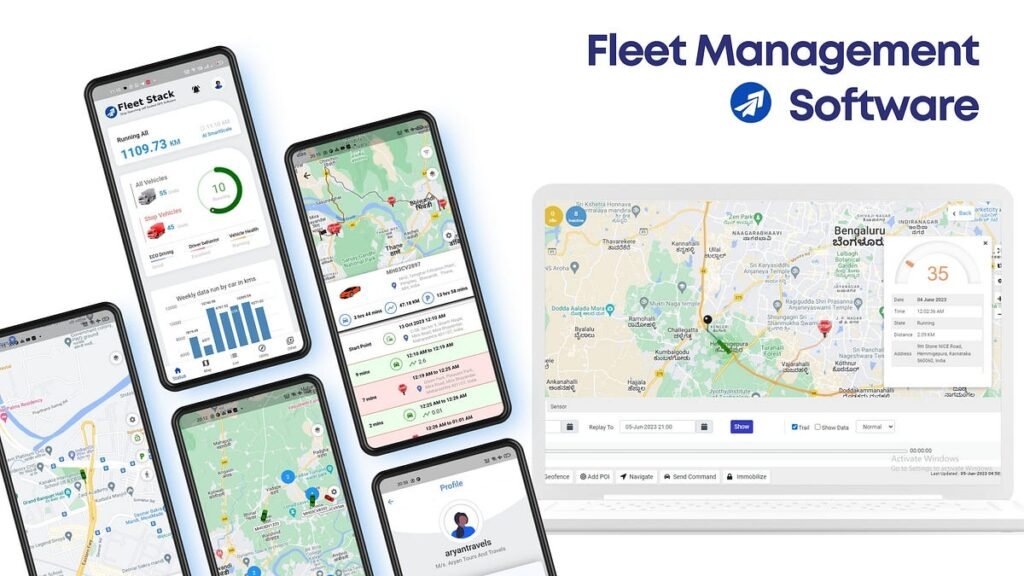
At the heart of any trucking logistics app is real‑time vehicle tracking, ideally combined with basic telematics (location, speed, status, and driver‑behavior alerts).
Must‑have elements:
- Live map view with multiple trucks and routes
- Estimated time of arrival (ETA) by stop
- Status tags (en route, at pickup, on delivery, returned)
- Driver‑behavior insights (speeding, long idling, hard braking, etc.)
From a product standpoint, this layer is often built on a custom mobile app architecture that prioritizes low‑latency updates and smooth rendering, even when multiple trucks are visible at once. A fleet management app development pattern shows how such patterns are applied in logistics‑focused mobile products.
2. Smart Dispatch and Load Assignment
A trucking logistics app should automate how you assign loads, not just display them.
Key capabilities:
- Load‑to‑truck matching based on origin, destination, equipment type, and driver availability
- In‑app order assignment with one‑tap acceptance
- Pickup and delivery time windows are baked into the job card
- Multi‑stop route planning for complex hauls
This kind of logic usually lives in a central backend system that feeds routes and assignments into a mobile app for drivers, similar to the way many modern logistics platforms are built on top of mobile app development services.
A software development services overview can help you understand how to structure this backend safely and scalably.
Table 2: On‑Device vs Backend Responsibilities in a Trucking App
| Layer | What usually lives here | Example in a trucking logistics app |
| Mobile client | Menus, navigation, status, in‑app messaging, and local data caches | Driver view, routes, POD screen, chat window |
| Backend / APIs | Route optimization, load‑assignment rules, POD storage, invoices, and reporting engines | Central dispatch engine, BI dashboards, integrations with ELD and accounting |
| DB / analytics | Historical data, KPIs, compliance logs, driver‑performance history | On‑time‑rate, revenue‑per‑mile, maintenance‑cost‑over‑time |
This separation of concerns aligns with enterprise mobile app development principles, where the mobile app is treated as a lightweight, UX‑centric client rather than a full‑stack system.
3. Digital Proof of Delivery (POD) and Documentation
Paper PODs and manually scanned BOLs create friction. A trucking logistics app should go fully digital on delivery records.
Core features:
- Driver‑captured photos of the delivery location and loads
- Electronic signatures captured on the mobile device
- In‑app fields for notes, discrepancies, and exceptions
- Digital document storage tied to each shipment
This kind of workflow is often supported by a secure, enterprise‑grade mobile‑app architecture that keeps records tamper‑resilient and ready for billing and compliance processes. A custom mobile app development services stack can help you enforce these rules consistently across devices and push‑notification channels.
4. Driver Communication and In‑App Messaging
Long‑haul and multi‑stop operations depend on clear, instant communication that doesn’t rely on endless phone calls.
What the app should include:
- In‑app chat between drivers, dispatchers, and shippers
- Push notifications for order changes, delays, and approvals
- Ability to attach photos, notes, and documents inside a thread
This keeps the entire chain of custody for communication inside the platform, reducing disputes and simplifying audits. A mobile‑first, responsive UX design approach can help shape this kind of driver‑friendly flow, which is common in today’s best logistics and fleet‑management apps. A UI/UX design services approach can guide this UX for truckers.
5. Route Optimization and Multi‑Stop Planning
Basic GPS navigation is not enough. A trucking logistics app should handle multi‑stop, multi‑load planning while respecting traffic, road restrictions, and operational rules.
Essential features:
Dynamic route optimization that recalculates around traffic
- Support for different truck types and load constraints
- Automatic leg‑splitting (pickup clusters, drop‑off clusters)
- Time‑sensitive windows and compliance rules
Such capabilities are often built on top of a scalable backend and API layer, with the mobile app acting as a lightweight client that receives optimized routes from a central engine. This is the same architecture pattern you see in a practical guide to scalable Android app development and modern logistics‑platform frameworks.
An AI app development layer can further enhance route‑recalculation with predictive traffic and delay models.
6. Fleet Management and Maintenance Logging
Beyond routing and loads, a good app helps keep the fleet running smoothly.
What to include:
- Maintenance schedules tied to engine hours or miles
- In‑app alerts for upcoming services and inspections
- Digital log of repairs, costs, and downtime
- Integration with fuel‑card or telematics systems
This is often layered on top of a custom‑built mobile‑app architecture so that dispatchers can track both shipments and truck health from a single interface.
A fleet management app development pattern can guide how these layers are organized in a logistics context and how agile software development services keep the product evolving safely.
7. Driver Profiles and Duty Time Tracking
For compliance and fair pay, the app should track driver activity and work time.
Key features:
- Driver profiles with licenses, certifications, and equipment preferences
- On‑duty/off‑duty toggles or automatic logging from GPS
- Hours‑of‑service reminders and alerts
- Daily/monthly driving‑time and distance summary
This prevents burnout and keeps the company within legal boundaries, while also feeding into payroll and performance analytics. A mobile app development team that follows enterprise software development practices can make this kind of tracking robust and audit‑ready.
A product‑strategy consulting lens can help prioritize which data points matter most for your business model.
8. Invoicing, Billing, and Settlement Tools
A trucking logistics app should not stop at the last mile. It should help close the revenue loop.
Critical capabilities:
- In‑app invoicing after POD is completed
- Multiple rate types (per‑mile, per‑load, per‑stop)
- Integration with accounting or factoring systems
- Digital payment tracking and settlement status
These features smooth the path from cash delivery and are often part of a larger enterprise software development and fintech app development architecture that modern platforms are built around.
A web app development strategy can help you design this kind of centralized reporting and invoicing layer alongside the mobile driver‑facing stack.
9. Admin Dashboard and Analytics
Everyone from the owner to the operations manager needs a centralized view of the business.
Dashboard must‑haves:
- Overview of active loads, trucks, and delays
- KPIs: on‑time rate, revenue per mile, fuel cost per mile, average stops per day
- Exception alerts (late arrivals, missed pickups, POD issues)
- Exportable reports for finance and compliance
This dashboard is typically powered by a web‑based admin panel that sits behind the same APIs your mobile app uses, ensuring a consistent data model across the organization.
A web development services approach can guide you in turning this into a scalable, role‑based analytics hub.
10. Multi‑User Roles and Role‑Based Access
A trucking logistics app usually serves three main user types: driver, shipper/broker, and admin/dispatcher.
How roles should behave:
- Driver sees assigned loads, navigation, POD screen, and messaging.
- Shipper/broker sees quotes, tender status, tracking, and reports.
- Admin/dispatcher manages truck assignment, routes, drivers, and billing.
This kind of role‑based architecture is common in enterprise mobile app development and keeps the app flexible enough to grow without exposing everyone to the same data.
A product‑market‑fit consulting workshop can help you define which features belong to each persona early in the development cycle.
11. Flexible Onboarding and Shipper‑Facing Portal
If your trucking logistics app supports a brokering or asset‑light model, it should include a shipper‑facing interface.
Features to cover:
- Shipper registration and onboarding workflow
- Rate requests and tender history
- Real‑time tracking and status updates
- Access to historical deliveries and invoices
This portal is often built as a responsive web app backed by the same APIs as the mobile driver app, creating a unified platform across channels. A web app development for modern, scalable web business applications strategy can guide how to design such a portal alongside mobile‑first trucking interfaces. An MVP app development approach can help you scope a lean initial version of this portal before over‑engineering it.
12. Offline Mode and Network‑Resilient Design
Truck drivers often work in areas with spotty or no connectivity. A good app must respect that reality.
Key resilience features:
- Ability to download today’s routes and loads before leaving
- Local‑only data entry (notes, status, POD) that syncs later
- Re‑send‑queuing for failed requests when the connection returns
- Graceful degradation: map tiles, status updates, and routing that still work partially offline
This level of resilience is typically baked into a custom mobile app development architecture that treats the backend as a “sync partner” instead of an always‑on dependency. A digital product audit services session can help you identify offline‑design gaps in an existing logistics app and prioritize fixes that improve driver experience without overhauling the entire stack.
13. Security, Compliance, and Data Governance
Transportation data is sensitive: locations, loads, rates, and driver information must be handled with care.
Critical safeguards:
- Role‑based data visibility (drivers don’t see rate sheets, etc.)
- Secure storage of login credentials and API keys
- Audit logs for who changed what and when
- Legal compliance (logging, hours‑of‑service, document‑retention rules)
Modern logistics platforms often pair this with software development services that follow strict security and architecture best-practice patterns.
A product‑development process guide can help you embed these safeguards from the start, and UI/UX design services can ensure that security prompts (e.g., MFA, biometric auth) feel natural rather than frustrating.
14. API Integrations and Extensibility
A trucking logistics app rarely exists in isolation. It should connect to your ecosystem.
Typical integrations:
- Load‑board APIs for tender discovery
- Telematics or ELD providers for engine and compliance data
- Accounting, ERP, and CRM systems for orders and billing
- Payment gateways and factoring platforms
An API‑first, microservices‑style backend, the kind you see in modern logistics and fleet‑management platforms, makes these integrations cleaner and more maintainable over time.
A software development services overview can help you assess how to structure such a backend alongside your driver‑focused client, and app store optimization guidance can help you plan long‑term maintenance and feature‑update rhythms that keep the app in the spotlight.
15. UX Designed for Truckers, Not Just Developers
A trucking logistics app can have all the features above, but if it’s hard to use on the road, it will fail.
Practical UX priorities:
- One‑hand‑friendly layout (drivers use touchscreens while driving)
- Large buttons, minimal typing, and voice‑enabled actions where possible
- Clear icons and status tags instead of dense text
- Low‑latency feedback (loads, alerts, POD confirmation)
Designing the UI/UX this way mirrors the kind of mobile‑first thinking you see in today’s best transport and logistics apps. A practical guide to mobile app design, usability, UX, and scalable products can help you shape a UX that feels intuitive for drivers, not just for engineers.
A UX‑competitor‑analysis services exercise can reveal how top trucking logistics apps handle quick status updates and emergency edits while on the road.
FAQs
What is a trucking logistics app, and what does it do?
A trucking logistics app is a mobile and web platform that connects drivers, dispatchers, and shippers into a single real‑time system. It typically handles load dispatch, route optimization, real‑time tracking, digital proof of delivery, in‑app messaging, and fleet management so that carriers can reduce empty miles, improve on‑time rates, and cut paperwork.
Why is real‑time tracking important in a trucking logistics app?
Real‑time tracking lets dispatchers and shippers see exactly where each truck is, estimated arrival times, and whether it’s on schedule. This helps reduce delays, improve customer communication, and quickly reroute around traffic or incidents, which is why it’s one of the core modules in any modern logistics platform.
How does a trucking logistics app handle driver‑hours‑of‑service and compliance?
Good trucking logistics apps track driver on‑duty/off‑duty hours, rest periods, and mileage directly in the app, often integrating with GPS and telematics data. This helps fleets stay within legal hours‑of‑service rules, generate compliance logs, and avoid penalties while keeping the data visible in the admin dashboard.
Can a trucking logistics app integrate with other business systems like accounting or load boards?
Yes. A well‑built trucking logistics app uses an API‑first backend so it can connect to accounting software, ERP systems, ELD/telematics providers, and load‑board APIs. This lets invoicing, reporting, and load‑discovery happen inside the same platform instead of relying on manual data entry.
Do trucking logistics apps need to work offline? Why or why not?
Yes, because many drivers operate in areas with poor or no cell coverage. A robust trucking logistics app should let drivers download routes, record status updates, and capture notes or PODs offline, then sync everything once the connection returns. This offline‑resilient design is now considered a best practice for fleet management and logistics apps.
In Summary
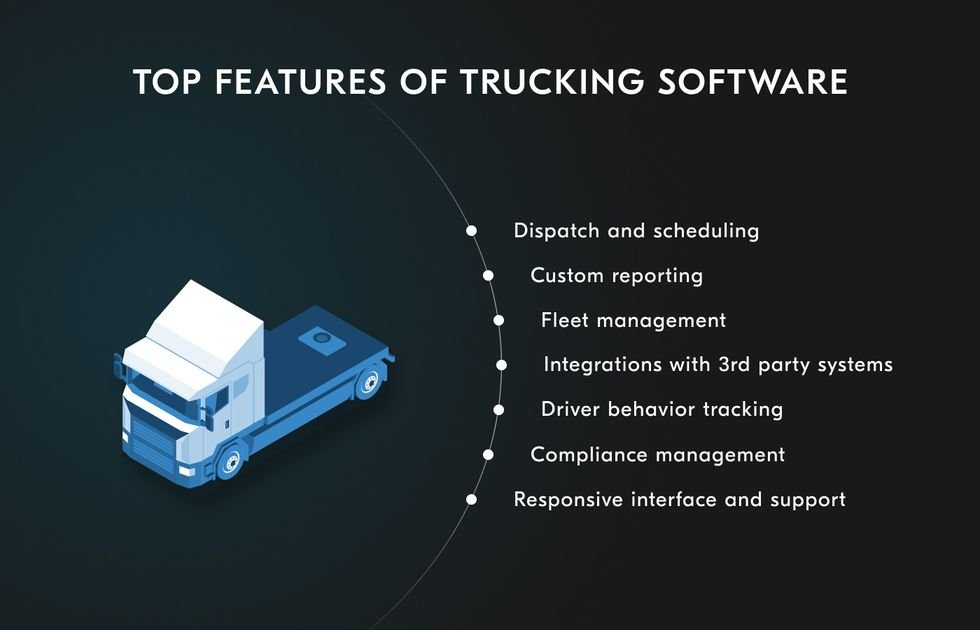
A trucking logistics app should be an integrated control center for your entire operation, not just a GPS‑tracking bolt‑on. At a minimum, it should provide:
- Real‑time truck tracking and telematics
- Smart dispatch and route optimization
- Digital proof of delivery and documentation
- In‑app messaging and alerts
- Fleet and maintenance logging
- Driver profiles and hours‑of‑service support
- Invoicing, billing, and settlement tools
- Admin dashboard and analytics
- Role‑based access and multi‑user roles
- Shipper‑portal / broker‑portal functionality
- Offline‑resilient design and strong security
When you treat this as a full‑stack logistics platform rather than a simple “tracking app,” you unlock the kind of efficiency and visibility that modern trucking businesses rely on to compete.
Ready to build a trucking logistics app tailored to your fleet? Talk to the Pixact Technologies team about a custom mobile and web logistics platform that fits your workflows, integrates with your existing tools, and scales as your business grows.