In 2026, building a future‑proof mobile app architecture means more than just following yesterday’s patterns. It means choosing an architecture that works well with Jetpack Compose, Kotlin Coroutines, StateFlow, and clean separation of concerns, one that scales with feature growth, supports strong testing, and remains maintainable as your team and codebase expand.
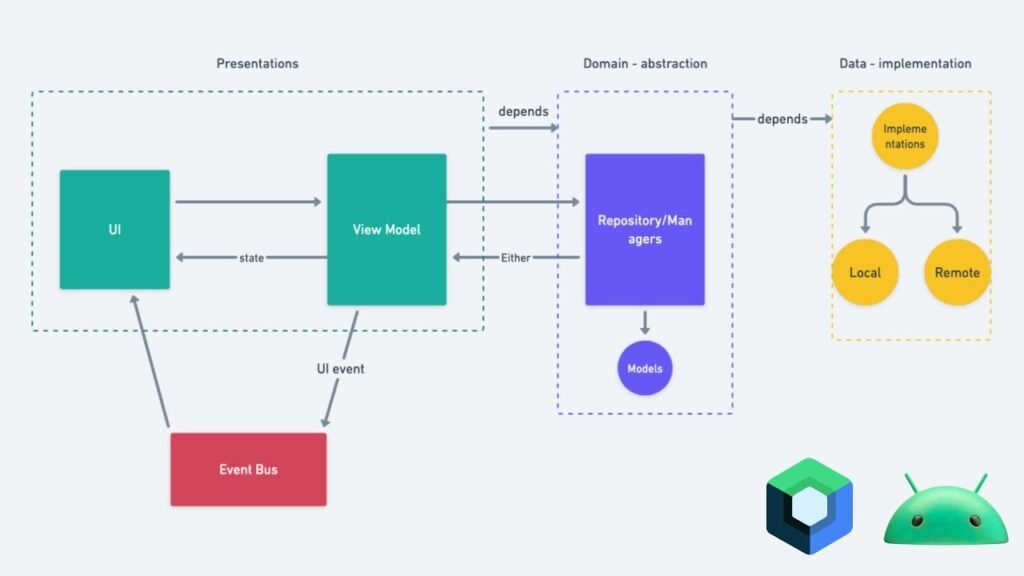
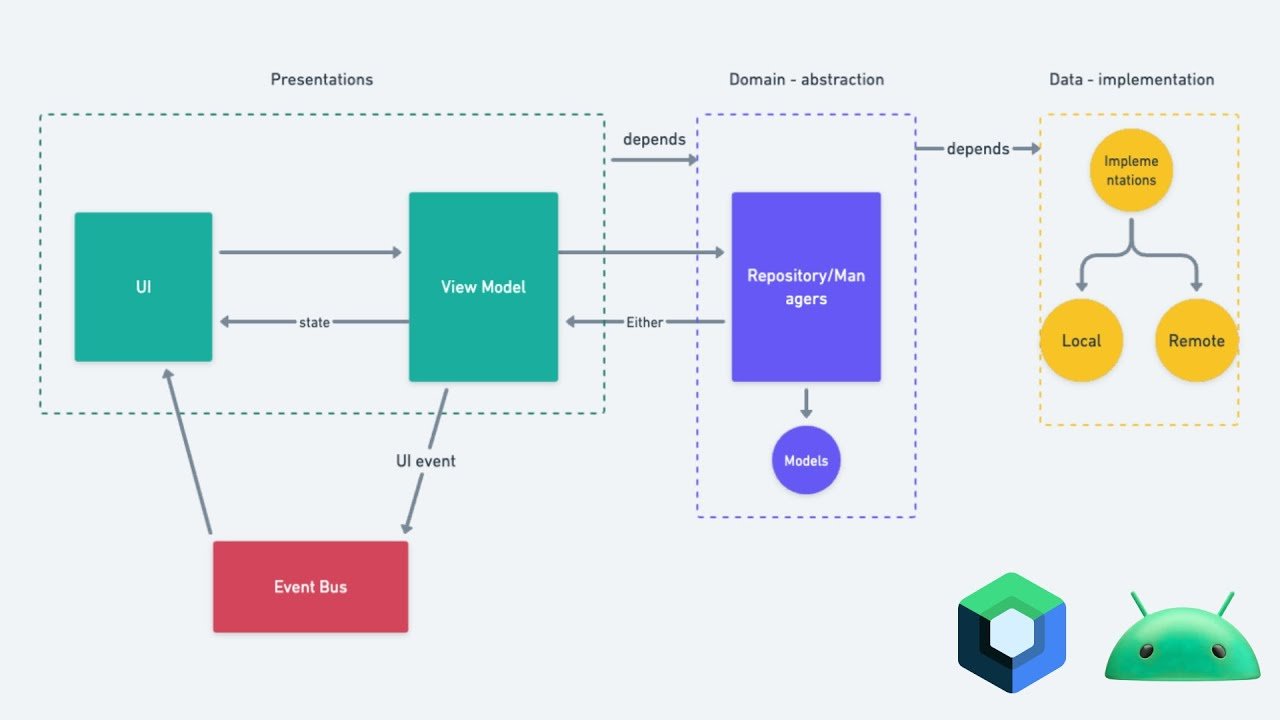
A robust modern Android architecture often combines MVVM (Model‑View‑ViewModel), MVI (Model‑View‑Intent), and unidirectional data flow (UDF). Together, they let you build a scalable mobile app architecture that’s resilient to change, easier to test, and aligned with how many teams design MVVM + MVI hybrid patterns today.
This approach is particularly relevant when you’re planning mobile app development services or enterprise mobile app development projects that will live for many years.
Why You Need a Modern Android Architecture in 2026
Mobile apps are becoming more complex: richer UIs, real‑time data, background sync, and frequent feature experiments. Simple MVC‑style patterns struggle under this load because:
- UI logic and business logic get tangled.
- State changes cascade unpredictably, leading to bugs and UI inconsistency.
- Testing becomes expensive and flaky.
A future‑proof mobile app architecture in 2026:
- Decouples UI, business logic, and data layers using clean architecture principles
- Uses Kotlin Coroutines and Kotlin Flow for async and reactive streams
- Applies Jetpack Compose state management patterns instead of manual setter‑based state
- Makes heavy use of unidirectional data flow to keep state changes explicit and predictable
This kind of architecture naturally supports MVVM + MVI hybrid patterns while remaining flexible enough to mix in MVP or event‑based flows where they make sense. It also fits well with mobile app development teams that want to ship complex features quickly without sacrificing long‑term maintainability.
Core Concepts: MVVM, MVI, and Unidirectional Data Flow
Before you combine them, it helps to understand what each pattern brings.
1. MVVM (Model‑View‑ViewModel)
- ViewModel holds UI‑related state and business logic, survives configuration changes.
- View (e.g., Compose UI, fragments) observes the ViewModel and reacts to state changes.
- Communication is reactive but not strictly one‑way; the View can still call commands on the ViewModel.
MVVM works well as a base architectural layer in many Android architecture 2026 stacks, especially when paired with Jetpack ViewModel, LiveData, or StateFlow and clean architecture layers. It’s a natural fit for custom mobile app development services that need to balance rapid iteration with clean separation of concerns.
2. MVI (Model‑View‑Intent)
- Intent represents user‑driven actions (tap, swipe, refresh).
- A model is a single, immutable state object for a screen or feature.
- View renders Model; user actions become Intents, which are sent to the Presenter/ViewModel to update the Model.
MVI usually implies unidirectional data flow:
User → Intent → Reducer → Updated Model → View.
Because the Model is often immutable, you get deterministic rendering, which improves Android state management and testability.
3. Unidirectional Data Flow (UDF)
Unidirectional data flow means all state changes flow through a single, explicit path:
- UI emits events/actions.
- Those events are handled by a reducer, ViewModel, or MVI store.
- The result is a new state object, which is pushed back to the UI.
This pattern is central to UDF‑based state management in 2026 and fits well with Redux‑like MVI vs reactive MVVM comparisons. Libraries like Orbit MVI or Mavericks demonstrate it in action, and the same discipline can be applied manually with Kotlin Flow and sealed state classes. It’s also a core aspect of mobile app optimization and the product development process.
When to Use MVI, MVVM, or a Hybrid Pattern
Not every screen needs a full MVI stack. Knowing when to use MVI instead of MVVM can save you complexity.
- Use MVI when:
- A screen has a complex, multi‑dimensional state (e.g., loading, error, empty, multiple filters).
- You want time‑travel‑style debugging and high‑fidelity test cases.
- The flow is event‑driven (e.g., real‑time dashboards, conferencing UIs).
- Use MVVM when:
- The UI is relatively simple, and the state is easy to model with exposed fields.
- You are working with fragment‑based UIs or migrating legacy apps gradually.
- You prefer reactive programming (coroutines, Flows, LiveData) without the extra MVI ceremony.
In practice, many teams use an MVVM + MVI hybrid pattern:
- Core architecture is MVVM (ViewModels, repositories, use cases), layered with clean architecture.
- Specific screens adopt MVI‑style, unidirectional data flow for complex state management.
- Jetpack Compose leans heavily into unidirectional data flow at the UI layer, making it a natural fit for both MVVM‑backed and MVI‑backed states.
This combination is particularly effective for enterprise mobile app development projects that need to scale across multiple teams and feature sets.
How UDF Improves Testability and Maintainability
One of the biggest reasons UDF improves mobile app testability is that state changes are explicit and isolated.
- In a proper MVI reducer, state transitions are pure functions:
State + Intent → State.
You can test every state transition the same way you test any pure function. - In MVVM with UDF discipline, you can:
- Expose state as a Flow/StateFlow of sealed classes.
- Update state only via intent‑dispatching functions.
- Avoid scattered MutableState mutations all over the codebase.
This approach is especially useful when you’re migrating legacy MVVM to unidirectional data flow (UDF). You can convert a screen piece‑by‑piece:
- Identify the core state holders (ViewModels).
- Replace direct mutableState updates with intent‑dispatching functions.
- Let the ViewModel compute a new state object and emit it via a StateFlow.
This kind of migration fits well with mobile app development teams that want to modernize their architecture without a full rewrite.
Table 1: MVVM, MVI, and UDF at a Glance
This table summarizes how each pattern fits into a future‑proof Android architecture.
| Pattern | Main idea | Best use case in 2026 |
| MVVM | ViewModel holds UI state and business logic. View observes and reacts. | Default pattern for most scalable mobile app architecture; pairs with Kotlin Flow and coroutines. |
| MVI | Single immutable Model; Intents drive state changes via a reducer. | Complex dashboards, high‑state screens, and Android state management where UI rendering must be highly predictable. |
| UDF | All state changes happen in one explicit direction. | Foundation layer for MVVM + MVI hybrid patterns and clean architecture Kotlin Flow‑based apps. |
This comparison answers the AEO‑style question: “When to use MVI instead of MVVM?” with a clear, architecturally grounded answer.
Table 2: Unidirectional Data Flow vs Traditional 2‑Way Binding
Not all state management is created equal. Here’s a compact comparison of unidirectional data flow versus two‑way‑style patterns.
| Aspect | Unidirectional Data Flow (UDF) | Traditional 2‑Way / Mutable UI State |
| State source of truth | Single, top‑level state container (e.g., sealed state class). | State lives scattered in UI, ViewModel, and adapters. |
| Updates | Intent → Handler → New State → UI. | UI can mutate state directly or via multiple setters. |
| Debugging | Easier to trace state evolution (time‑travel‑style). | State mutations can be unpredictable and harder to debug. |
| Testing | Deterministic; intent‑state transitions are testable as pure functions. | Fragile; tests often depend on UI state or multiple assert paths. |
This pattern strongly supports the idea that modern Android app architecture uses a combination of Jetpack Compose, Coroutines/Flows, and Clean Architecture for future‑proofing, especially when you want immutable state management, mobile, and reusable UI components. It’s a natural fit for mobile app optimization and the product development process.
How to Migrate a Legacy MVVM App to UDF
If you already have an MVVM‑based Android app, you can move toward unidirectional data flow incrementally:
- Identify per‑screen state and gather it into a sealed state class or dedicated data class.
- Replace mutable UI‑tied state (e.g., var isLoading: Boolean) with immutable state objects exposed via StateFlow.
- Introduce intent‑style functions (loadWeather(), refresh()) in the ViewModel instead of direct state mutations.
- Use Jetpack Compose’s unidirectional data flow conventions at the UI layer, promoting state up to the ViewModel.
This migration path supports the “migrating legacy MVVM to unidirectional data flow (UDF)” intent and aligns with how many teams evolve Android architecture 2026 patterns. It’s a natural fit for mobile app development teams that want to modernize their architecture without a full rewrite.
FAQs
What is the best app architecture for Android in 2026?
For many teams, the best architecture today is a combination of Clean Architecture, MVVM as a base, and MVI‑style principles where needed, all backed by Kotlin Coroutines, Kotlin Flow, and Jetpack Compose. This setup supports scalable mobile app architecture and immutable state management.
When to use MVI instead of MVVM?
Use MVI when you have complex, multi‑state screens (e.g., dashboards, real‑time data feeds, multi‑step wizards). Use MVVM for simpler flows or when you want to keep the architecture lighter. The MVI vs MVVM performance considerations 2026 usually favor MVVM for simple screens and MVI for highly interactive, state‑rich ones.
How does UDF improve mobile app testability?
Unidirectional data flow improves testability because state changes are explicit and isolated. You can model UI events as intents and state as sealed classes, then test every state transition as a pure function. This is why UDF improves mobile app testability and reduces brittle UI tests.
How can you build a scalable UI layer with MVI and Jetpack Compose?
You build a scalable UI layer by:
Keeping state in ViewModels or MVI stores.
Exposing the state as StateFlow/Flow and consuming it in Compose.
Using Compose’s unidirectional data flow patterns (state up, events down).
This creates a scalable UI layer with MVI and Jetpack Compose setup that’s easy to extend.
How do you solve complex state management in Android using Model‑View‑Intent?
With MVI‑style Android state management, you define sealed state classes, keep them immutable, and update them only via reducer‑style functions driven by intents. The UI becomes a pure render function of the state, which simplifies debugging and testing.
The Final Verdict!
A future‑proof mobile app architecture in 2026 combines MVVM, MVI‑inspired unidirectional data flow, and clean architecture layers, backed by Kotlin Coroutines, Kotlin Flow, and Jetpack Compose. This setup lets you build a scalable mobile app architecture that’s easy to test, extend, and maintain as features grow.
Our mobile app development and software development services teams design Android architecture 2026‑ready systems using MVVM + MVI hybrid patterns, Jetpack Compose state management, and clean architecture Kotlin Flow‑based backends that support long‑term product evolution.
If you’re evaluating whether your current Android architecture is ready for a more complex state, or want help migrating a legacy MVVM app to a UDF‑based model, Pixact Technologies can help.