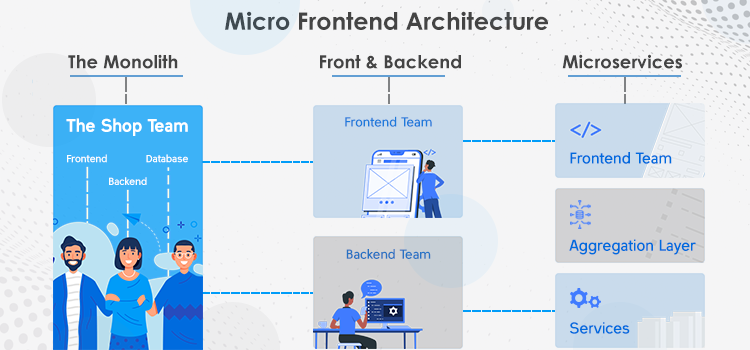
Monolithic mobile apps become harder to navigate, test, and release as they grow. Teams hit slowdowns in builds, deployments, and experimentation, because every change must pass through the same shared codebase and release cycle. In this environment, micro‑frontend concepts, originally popularized on the web, are starting to reshape how teams structure their mobile app architectures, especially in complex B2B, super‑apps, and platform‑style products.
Implementing micro‑frontend concepts in mobile app development means breaking a large, single‑codebase app into smaller, feature‑oriented modules that can be developed, tested, and deployed more independently.
These modules usually share a common shell that handles navigation, theming, analytics, and identity, while each module owns its own UI and business logic. This pattern is especially useful for enterprise mobile app development and software development services that support multiple product lines inside one app.
What Micro‑Frontends Mean in Mobile Contexts
In the web, micro‑frontends are often described as independently deployable UI fragments that live inside a single page. Mobile doesn’t work the same way: there’s no browser DOM, and apps are compiled into native binaries. So mobile micro‑frontends look more like “micro‑apps” or “feature modules” that are:
- Identified around user‑facing features (Login, Dashboard, Checkout, Admin, etc.)
- Packaged as separate libraries, frameworks, or dynamic modules rather than full standalone apps
- Composed at runtime by a host‑shell that decides which feature module to show and how to wire it into the app’s navigation and data context
This approach is close to what’s described in several guides on micro‑frontends for mobile apps and modular mobile app architecture. It makes it easier to treat each feature as its own domain, with its own team, tests, and release cadence.
Core Benefits of Micro‑Frontends for Mobile Apps
Adopting micro‑frontends for mobile apps doesn’t just clean up the codebase; it changes how teams ship value.
1. Independent, Parallel Feature Development
Instead of forcing every change into the main app, micro‑frontends allow teams to own feature‑based modules. Each module has its own:
- UI components and navigation
- Data models and business logic
- Testing and quality‑gate rules
This is a common pattern in mobile app development services teams that support multiple product lines inside one app. It lets you:
- Ship features on their own timelines, without coordinating every release
- Apply product‑strategy consulting at the module level rather than globally
- Experiment with pricing, layouts, or flows inside a single feature without risking other parts of the app
2. Faster Builds and Incremental Delivery
Large monolithic builds slow down CI and delay feedback. With modular mobile app architecture, you can:
- Build and test individual feature modules in isolation
- Use dynamic feature delivery (e.g., Android Dynamic Feature Modules or on‑demand frameworks on iOS) to ship parts of the app only when users need them
- Keep the main app bundle small and fast, which is especially important for on‑demand‑delivery apps and fitness‑app‑style experiences
This fits well with CI/CD for micro‑frontends in mobile and modern product‑development‑process workflows that emphasize fast, reliable releases.
3. Flexible Technology and Framework Choices
Micro‑frontends can support polyglot UIs, using different frameworks or approaches for different parts of the app. In mobile, this can manifest as:
- A core native app with specific modules built in React Native or Flutter
- Shared business logic written in Kotlin or Kotlin Multiplatform
- Legacy sections that remain older native code, while new flows are built with modern tools
This kind of modular mobile app architecture is common in enterprise‑grade rewrites and mobile app modernization projects where you can’t replace the entire app at once.
4. Safer Testing and Controlled Experimentation
When each module is reasonably self‑contained, testing becomes simpler and more targeted:
- You can write unit, integration, and UI tests for each micro‑front end in isolation
- You can run A/B tests or feature‑flag experiments that are scoped to a single module
- Rollbacks and canary‑style releases are easier to reason about because they’re tied to a specific feature
This supports mobile app optimization and product‑market‑fit work, where you want to iterate quickly on specific flows without destabilizing the rest of the product.
How Micro‑Frontends Communicate in a Mobile App
One of the biggest questions about micro‑frontends is how they communicate and share data inside the app. The table below shows three core concerns and how they are typically solved in a mobile‑first, shell‑driven architecture.
| Concern | Typical solution | Why it matters |
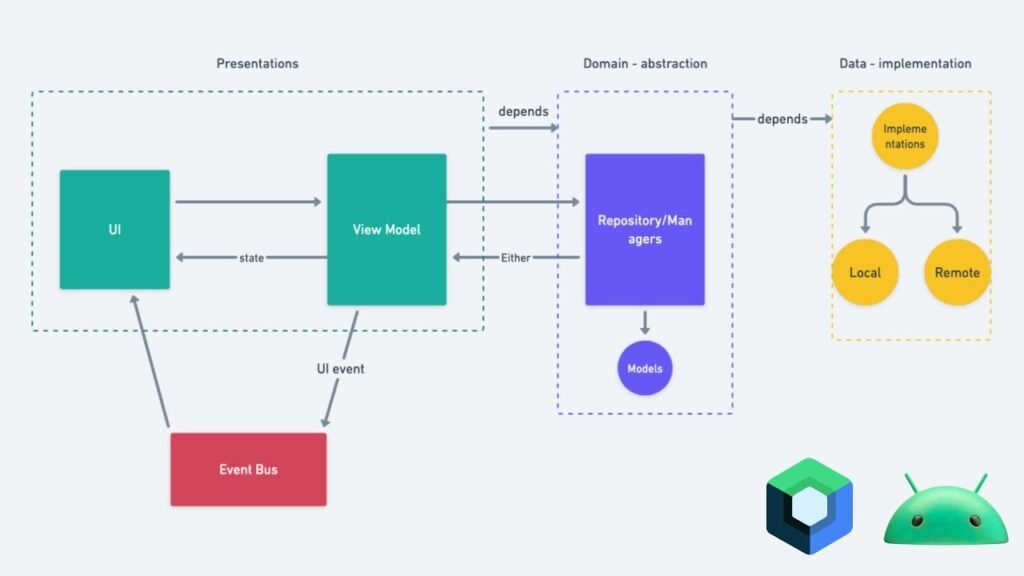
| How modules communicate | Modules talk through a shared context or event bus in the shell. They pass data explicitly via parameters or events instead of reading each other’s internal state directly. | This keeps modules loosely coupled and makes the architecture easier to evolve, which aligns with standard software development services practices. |
| Navigation between modules | The shell owns root navigation. Each module exposes a “launch this flow” API; the shell calls that API and handles transitions, deep‑links, and back‑stack behavior. | This keeps navigation predictable and UX consistent, matching modern product‑development‑process design patterns. |
| State and identity sharing | Shared services (auth, analytics, configuration) live in the shell and are injected into each module. Modules cannot directly access global mutable state. | This simplifies debugging, logging, and telemetry, and is a common pattern in enterprise mobile app development. |
Two Ways to Structure Micro‑Frontends in Mobile
Here are two common patterns that many teams use to implement micro‑frontends in mobile apps.
| Architecture | How it works in mobile apps | Good for |
| Shell + Feature Modules | A host shell app manages root navigation and cross‑cutting services.</br>Each feature module is a separate library (Android module, iOS framework, or package) with a clear API that the shell calls. | Medium‑to‑large apps with multiple teams and gradual migration paths.</br>Aligns with modern mobile app development services and modular architecture. |
| Dynamic / On‑Demand Modules | Parts of the app (e.g., Admin, Report Viewer, Settings) are shipped or downloaded only when needed,</br>using Android Dynamic Feature Modules, iOS on‑demand frameworks, or custom loaders. | Apps that need small initial install sizes.</br>Super‑app‑style products with many features.</br>Performance‑sensitive environments like on‑demand delivery apps. |
How to Start Implementing This in Your App
You don’t need to rebuild your app to start using micro‑frontends in mobile. A practical path is:
1. Identify Candidates for Feature Modules
Pick highly independent user journeys such as:
- Onboarding and login
- User profile and settings
- Analytics dashboard
- Admin tools
These correspond to the same domains you’d see in modular mobile app architecture and micro‑frontends vs monolithic mobile apps discussions.
2. Define Clean Module Interfaces
Each module should expose a minimal, explicit API, such as:
- Functions: startModule / presentModule
- Output callbacks: onSuccess, onCancel, onError
- Theme and configuration objects passed from the shell
This prevents the anti‑pattern where one module directly imports the internal implementation of another, which is a leading cause of later headaches.
3. Build or Refactor a Shell
Create a host‑shell that:
- Handles root navigation and screen‑container patterns
- Injects analytics, logging, error‑handling, and auth context
- Loads modules statically or dynamically as needed
This is similar to how teams describe a shell‑based micro‑frontends architecture for mobile and mobile micro‑app compositions.
4. Migrate One Module at a Time
Start by encapsulating one feature into its own module and exposing it via that API. Then:
- Untangle its dependencies on the rest of the app
- Refactor other parts of the app to use the new interface
- Repeat for the next feature
This incremental approach is recommended in how to break down monolithic mobile apps into micro‑frontends and other practical guides.
5. Standardize Cross‑Cutting Concerns
Once you have multiple modules, enforce patterns around:
- Analytics and telemetry
- Error‑tracking and crash reporting
- Theming and design‑system usage
This is especially important in enterprise mobile architecture solutions where consistency and governance matter.
Some Challenges to Be Aware Of
Micro‑frontends are powerful but not free of trade‑offs:
Coordination overhead:
More modules mean more teams coordinating releases, versions, and interface contracts. This is where agile software development services and strong product‑strategy consulting help.
Tooling complexity:
Managing multiple modules, dependencies, and CI/CD pipelines can be more complex than a single repo. Practices such as CI/CD for micro‑frontends in mobile reduce this cost.
UX and design fragmentation:
If each module “owns its UX,” the app can feel like a collection of disconnected screens. A shared design system and clear UX guidelines, similar to what’s recommended in UI/UX design services, keep the experience coherent.
If handled well, modular mobile app architecture and mobile micro‑apps development become scalable and maintainable; if handled poorly, you end up with many small monoliths instead of a true architecture.
FAQs
What are the benefits of micro frontends in mobile apps?
Micro‑frontends in mobile apps improve feature‑based ownership, build speed, and release cadence. Teams can work independently, test locally, and ship incrementally, which is especially helpful in enterprise mobile app development and super‑app‑style platforms.
How do you implement micro frontends in mobile apps?
You implement them by breaking the app into feature‑based modules, giving each module a clear API, and composing them via a host shell that handles navigation and cross‑cutting services. This pattern is common in modular mobile app architecture and mobile app modernization projects.
What is a superapp in mobile micro‑frontend architecture?
A superapp is a single native app that hosts many independent services or experiences (e.g., payments, delivery, maps, messaging). In a micro‑frontend architecture, each service behaves like a micro‑app or module, with its own team, release cycle, and UX, while the shell integrates them into a unified app.
How do micro frontends communicate in a mobile environment?
They communicate via explicit interfaces and events, usually mediated by the shell. The shell owns shared data, identity, and analytics, while modules pass data and notify the shell of results. This keeps modules loosely coupled, which is a best practice in mobile micro‑apps development and enterprise mobile architecture solutions.
Are micro frontends suitable for React Native or Flutter?
Yes. Micro‑frontends work well with React Native and Flutter because both allow you to express feature‑based modules as libraries or packages that can be composed into a host app. This fits the pattern of micro‑frontends vs monolithic mobile apps, especially when you want one codebase that can evolve modularly.
The Finale!
Implementing micro‑frontends concepts in mobile app development can significantly improve how your team scales UX, releases new features, and maintains large apps. Whether you choose a shell‑based modular architecture, on‑demand feature modules, or a mix of native and cross‑platform micro‑frontends, the key is to start small, define clear boundaries, and standardize communication and navigation patterns.
If you’re evaluating whether your app is ready for this kind of architecture, or how to refactor a monolithic app into micro‑frontends without disrupting the user experience, Pixact Technologies can help.
Our mobile app development and software development services teams work with clients globally to design modular mobile app architecture, migration plans, and CI/CD‑ready micro‑frontends that make long‑term product growth sustainable.